schede

Visualizzazione post con etichetta drive. Mostra tutti i post

24 dicembre 2012

how to assign a drive letter to selected DIR


Microsoft Windows allows you to define virtual disk drives.
Any drive letter that is not currently used to represent a physical drive can be defined as a virtual drive.
A virtual drive is a folder of a physical drive that acts like it is a separate drive, unto itself.

Some reasons you may a want, or need, to do this are:

  • As a handy shortcut.
  • Because some software requires it.
  • In a batch file, so that the path only needs to be referenced once at the top of the batch file, and therefore could be easily changed later, if need be.

Pretend that you have a file folder called C:\data\docs, that you use it constantly, and that you would like to refer to it with a shortcut of W:.
Open up a command prompt window and issue the following command:

SUBST w: C:\data\docs

SUBST is short for substitute. (DOS commands are case-insensitive, so you could enter it as “subst” as well.)
So, now, W:\intro.doc is the same thing as C:\data\word_docs\intro.doc — two different ways to refer to the same file.

If you ever move the folder, and want to change the shortcut, just reissue the SUBST command:

SUBST w: D:\new_location\docs

Virtual drive definitions are permanent, until explicitly released.
If and when you decide you’re not using it anymore, the command to remove the association is:

SUBST w: /D

To find out what virtual drives are currently defined, just type SUBST on a line by itself:

SUBST

Be aware that when deleting any files via a virtual drive letter reference, the files are deleted immediately, bypassing the recycle been.

----------------

If you want create an assignement at startup


SUBST N: c:\whatever\whatever

create a text file containing the command with a .CMD or .BAT extension, and put it here:

\Users\All Users\Microsoft\Windows\Start Menu\Programs\Startup


----------------

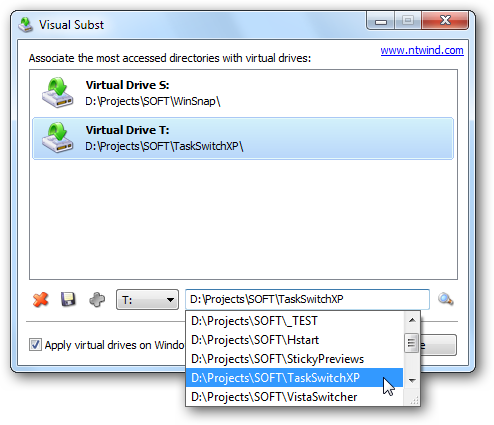
Visual Subst  is a small tool that allows you to associate the most accessed directories with virtual drives.
It uses the same API similar to the console 'subst' utility.
Here is the related web page.


sources:
www.codejacked.com
www.sevenforums.com
www.ntwind.com/software

23 ottobre 2012

How to show drive letters in My Computer view


To display drive-letters, use these steps:


  • Click Start, Run and type Regedit.exe
  • Navigate to the following location:
  • HKEY_LOCAL_MACHINE \ SOFTWARE \ Microsoft \ Windows \ CurrentVersion \ Explorer
  • If not already exists, create a REG_DWORD value named ShowDriveLettersFirst
  • Double-click ShowDriveLettersFirst and set its Value data to 0/1/2/4 value
  • Exit the Registry Editor
Here are the other possible data for ShowDriveLettersFirst registry value:
  • 0: how drive letters after description (default) 
  • 1: Show network drive letters before description, and local drive letters after description 
  • 2: No drive letter is displayed 
  • 4: Show drive letters before description


fonte: http://windowsxp.mvps.org/showdrivelettersfirst.htm

11 agosto 2012

Assign a drive letter to a folder in Windows

Windows allows you to define virtual disk drives.
Any drive letter that is not currently used to represent a physical drive can be defined as a virtual drive.
A virtual drive is a folder of a physical drive that acts like it is a separate drive, unto itself.

SUBST w: C:\documents\my

Virtual drive definitions are permanent, until explicitly released. 

SUBST w: /D

To find out what virtual drives are currently defined, just type SUBST on a line by itself:

SUBST

When deleting any files via a virtual drive letter reference, the files are deleted immediately, bypassing the recycle been.

Visual Subst is a small tool that allows you to associate the most accessed directories with virtual drives. It uses the same API similar to the console 'subst' utility, but makes it easier to create and remove virtual drives in a GUI way.